


Online Payment Help
How to Make a Payment
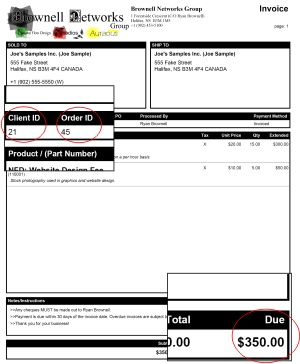
In order to make a payment you must have the invoice you wish to make a payment on with you.
You first need to find your client number. It is labeled Client ID and is located on the on the row just below the billing address.
You then need to find your invoice number. It is labeled Order ID and is located immediately next to the Client ID.
And finally you need to find the amount the invoice is for. This is located in the lower right hand corner of the invoice. In the event that your account has late charges please add these to the total amount due on the invoice.
Take this information and then fill out the form of the online bill payment page and click on “Get Started.”
You will be then redirected to a secure webpage located at https://www.paypal.com. Take note of the “s” in the http:// that “s” stands for security so you can rest assured that your payment and transaction is secure. In the event that you get a warning from your browser stating that there are insecure items on the page, it is ok to proceed, as that item is just an image.
Please note that there is a 2.987% + $0.30 processing fee.

© 2008-2011 Ryan Brownell